Opening Your Profile
After login, click your avatar in the top-right corner and select Profile, or go to https://connect.gulshansync.com/profile.
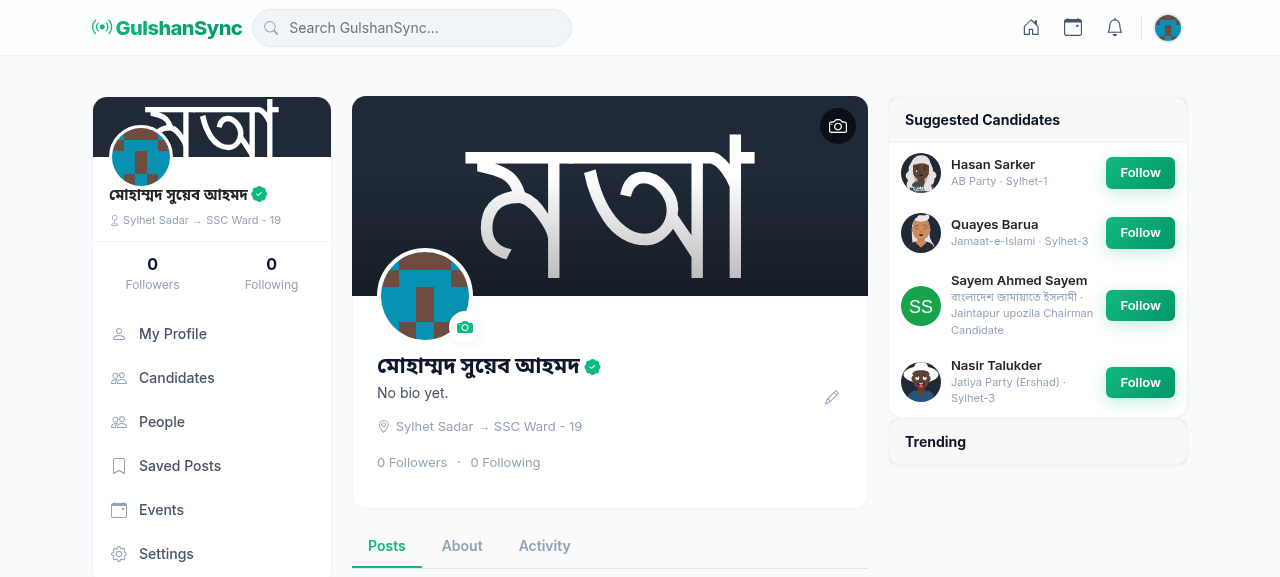
Profile Sections
Your profile page shows:
- Cover Photo — large banner image at the top
- Profile Photo — your avatar
- Name and Username — display name and @username
- Bio — short description (max 200 characters)
- Contact Info — email, phone, website (optional)
- Stats — number of posts, followers, following
- Posts — all your posts, most recent first
- Events — events you have RSVP'd to
Editing Your Profile
- Go to your profile page.
- Click Edit Profile.
- Update your bio, contact info, or location.
- Upload a new profile photo or cover photo.
- Click Save Changes.
Viewing Other Users' Profiles
Click any user's name or avatar anywhere in Connect to view their profile. From their profile, you can:
- Follow them (their posts appear in your feed)
- Send them a message (if enabled)
- View their posts and events
- Report inappropriate content