Opening the Registration Page
Go to https://connect.gulshansync.com/register or click Sign Up on the login page.
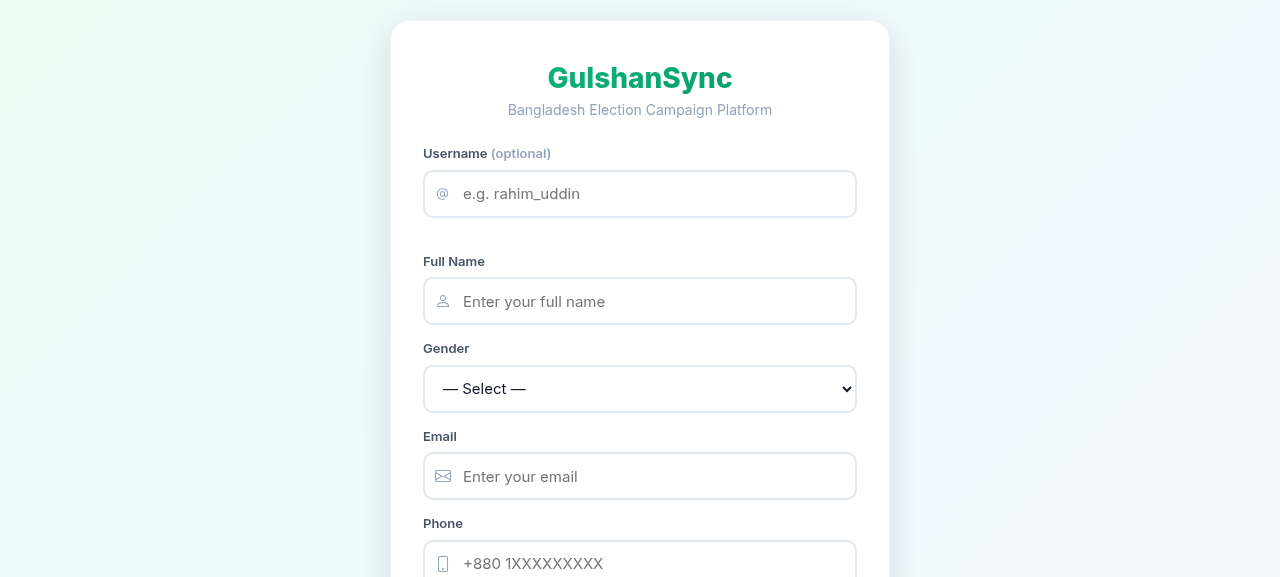
Registration Form Fields
| Field | Description | Example |
|---|---|---|
| Full Name | Your full real name | Rahim Uddin |
| Valid email address — used for notifications | rahim@example.com | |
| Phone | 11-digit mobile number (optional) | 019XXXXXXXX |
| Username | Unique username for your profile URL | rahim_uddin |
| Password | At least 8 characters | •••••••••• |
| Confirm Password | Re-enter your password | •••••••••• |
Step-by-Step Registration
- Go to
https://connect.gulshansync.com/register. - Enter your full name.
- Enter your email address.
- Choose a unique username (this will be your profile URL:
/profile/your-username). - Enter a password (at least 8 characters).
- Confirm your password.
- Optionally upload a profile photo.
- Click Sign Up.
- You will receive a verification email — click the link to verify your email.
- After verification, you can log in and start posting.
Use your real name
Connect is a civic platform. Use your real name — anonymous accounts may be removed by moderators. Verified candidates and official campaign staff use their real identities.